



Still using Zoom calls to run your focus groups? Here at Trymata, the user research experts, we’ve just released a virtual focus group solution with all the capabilities researchers need – and none of the downsides of a DIY approach.
In the past several years, we’ve branched out heavily from our roots in remote unmoderated user testing, first adding a fully fleshed-out moderated testing tool. Last year, we introduced our IDIs (in-depth interviews) solution.
Now, with focus groups as well, we’re offering the full range of synchronous and asynchronous user research methods, all tailor-made to support the needs of UX, product, and marketing professionals.
Why use Trymata Focus Groups instead of the DIY way?
It is possible to run focus groups and other types of user research by cobbling together tools you’ve already got – a generic meeting solution like Zoom/Teams/Meet, note-taking in a Google doc or other notes tool, maybe a follow-up survey link from yet another platform.
While this all works in a rudimentary sense, it has some significant downsides:
- Lack of defined roles: You can have your observers join the call to sit in and take notes, but there’s no “1-way mirror” in your generic calling solution. Participants know they’re there, silently watching, and that intensified under-the-microscope feeling can impact how they feel, speak, and act during the session. Moderators likewise don’t have any specialized features to help facilitate the session.
- Lack of research-specific features: While a DIY approach covers the basics, you’ll be lacking an array of useful features & capabilities. Things like pre- and post-session surveys, scripts for moderators to follow, collaborative timestamped note-taking for observers, all will either be missing, or included only via frequently switching back and forth between different apps and tools throughout the study experience.
- Lack of unified, accessible data storage: So you ran your focus group – now what? Going the DIY route, most likely your recordings, notes, and auxiliary data all get dumped into a Google Drive folder or other repository where they are not integrated together, lacking specialized features for easy review, analysis, and sharing, and will likely be underutilized.
To sum things up, DIY approaches are messy and complicated, with a high number of potential points of failure, lacking in specialized features to get the greatest payoff for your efforts, and unequipped to enable effective, collaborative analysis post-study.
On the other hand, purpose-built solutions like Trymata Focus Groups are intentionally designed in a way that makes your research easier, smoother, more effective, and more powerful.
With specially defined roles, your observers will be invisible to participants, taking notes discreetly and live-messaging with moderators in a designated backroom chat. All notes taken during the session will be saved as timestamped annotations tied directly to the recording. Meanwhile, moderators will be able to run the session with a prepared script built into the call interface.
On the participant side, there’s always only 1 link they’ll need to visit – no matter the different components you’ve included. Pre-session and post-session surveys are all presented cohesively in a single flow, redirecting participants where and when needed, to ensure completion.
Once your study is complete, the video recording, transcripts, survey responses, notes, and any other auxiliary data will all be stored and displayed together in an integrated shared dashboard for streamlined analysis. Share video clips externally or even create highlight reels of key moments from the call.
How Trymata Focus Groups work
Creating a focus group study with Trymata is easy. Our quick setup mode allows you to get started in seconds – just choose a study title, the number of participants, and maximum call length, and your room links will be ready to share as soon as you launch.
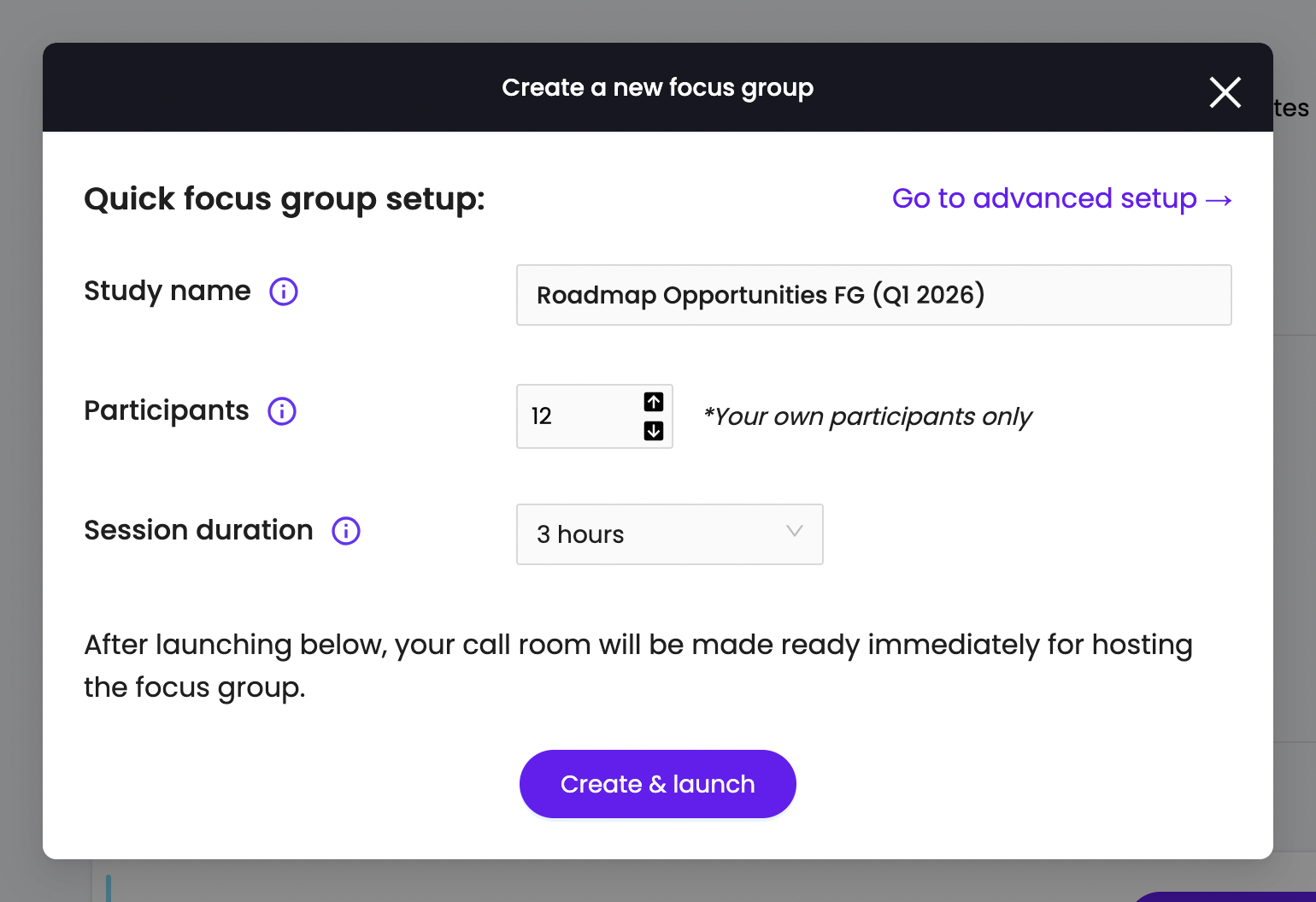
For more options, use our advanced setup mode – this easy, 5-step form lets you add survey questions, write a script for the moderators to reference, and more.
Once you’ve launched your focus group study, the Trymata platform immediately generates a shareable participant link, observer link, and moderator link. These links can be used at any time (so long as a moderator initiates the call room). Just coordinate a date & time with your colleagues and participants, and then hold the session at your convenience.
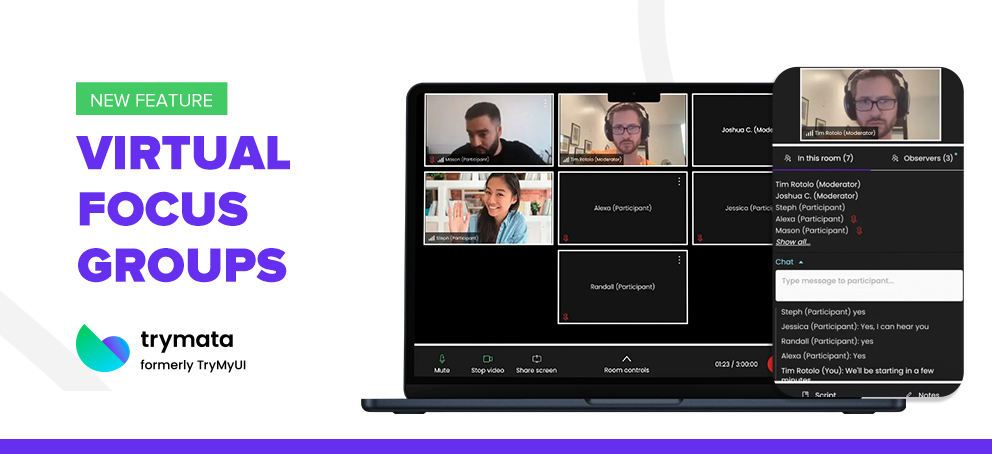
During the focus group session, the call interface will be reminiscent of standard calling tools like Zoom, to make the experience smooth and intuitive – but with the specialized research features of Trymata:
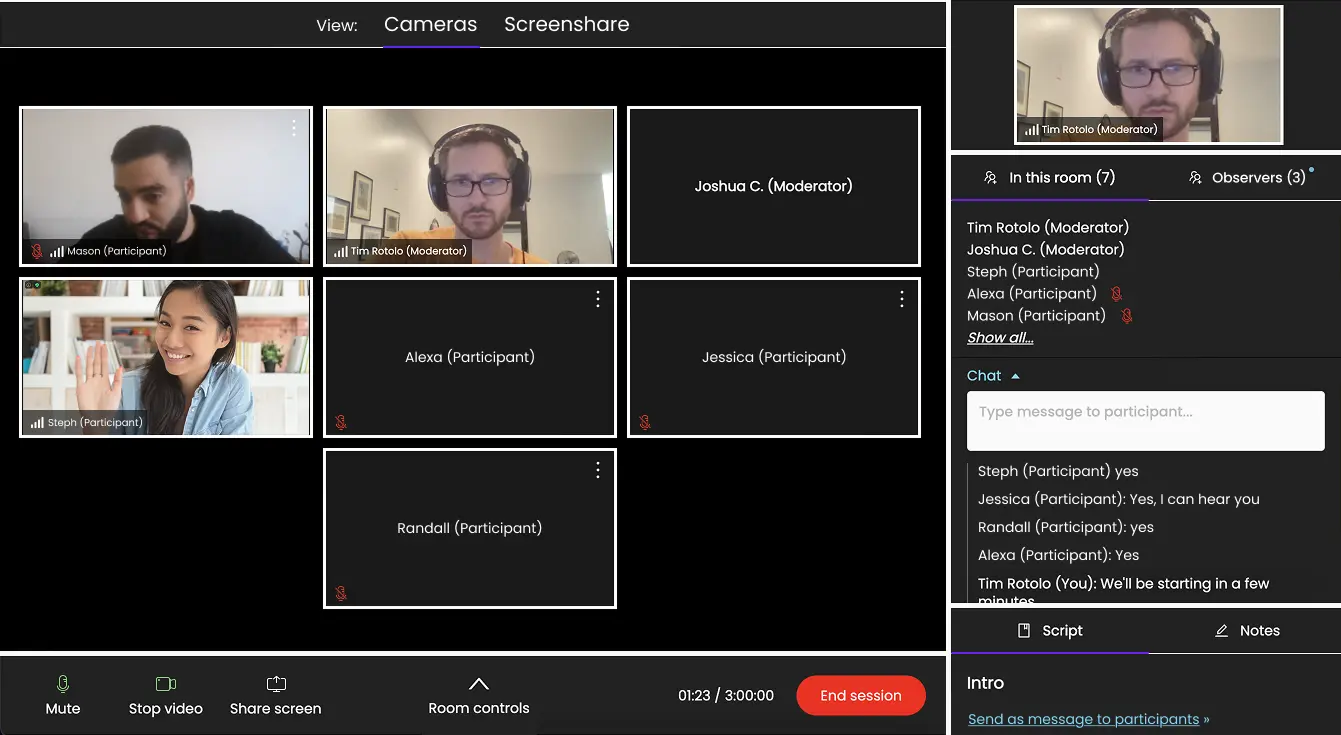
In the main screen area, you’ll see the face cameras of all participants and moderators, with a bottom bar for controlling your own feeds (as well as a handy “Room controls” menu for quick global actions).
In the right-hand column, you’ll see who’s present in the call, with separated frontroom and backroom live chats. This side column is also where you can access your prepared call script, and take collaborative timestamped notes that the whole backroom can see.
With Trymata’s call interface, you’ll be able to put all your focus into running a great study, without having to figure out a complicated or unfamiliar new system – ensuring you get the most from your research.
Quick questions & answers
Read below for quick answers to some basic, common questions about Trymata Focus Groups.
Q: Are there any limits on how many people can join a Trymata Focus Group?
A: No – you can invite any number of participants, moderators, and observers to join.
Q: How long can a Trymata Focus Group session last for?
A: Up to 3 hours
Q: Do my colleagues or participants need any 3rd-party tools/softwares to join?
A: No! Our solution is completely browser-based, so no one will need to download or set up anything to participate – just join at the share link.
Q: How do I access Trymata’s Focus Groups feature?
A: In your Trymata account, you’ll see a new Focus Groups dashboard available via your top & side menus. You’ll be able to create new study setups there – to actually run them with real participants, talk to our team to unlock the full capabilities.
Schedule a call with us here >